









.png "Legal Notice issued to CM Bhagwant Maan for defamation by Shri. Sardar Sukhbir Singh Badal")




In adherence to the rules and regulations of Bar Council of India, this website has been designed only for the purposes of circulation of information and not for the purpose of advertising.
Your use of SoOLEGAL service is completely at your own risk. Readers and Subscribers should seek proper advice from an expert before acting on the information mentioned herein. The content on this website is general information and none of the information contained on the website is in the nature of a legal opinion or otherwise amounts to any legal advice. User is requested to use his or her judgment and exchange of any such information shall be solely at the user’s risk.
SoOLEGAL does not take responsibility for actions of any member registered on the site and is not accountable for any decision taken by the reader on the basis of information/commitment provided by the registered member(s).By clicking on ‘ENTER’, the visitor acknowledges that the information provided in the website (a) does not amount to advertising or solicitation and (b) is meant only for his/her understanding about our activities and who we are.
Resource centre is one stop destination for users who are seeking for latest updates and information related to the law. takes the privilege to bring every single legal resource to your knowledge in a hassle free way. Legal Content in resource centre to help you understand your case, legal requirements. More than 3000 Documents are available for Reading and Download which are listed in below categories:
SoOLEGAL Transaction Services Agreement :
By registering yourself with SoOLEGAL, it is understood and agreed by you that the Terms and Conditions under the Transaction Services Terms shall be binding on you at all times during the period of registration and notwithstanding cessation of your registration with SoOLEGAL certain Terms and Conditions shall survive.
"Your Transaction" means any Transaction of Documents/ Advices(s), advice and/ or solution in the form of any written communication to your Client made by you arising out of any advice/ solution sought from you through the SoOLEGAL Site.
Transacting on SoOLEGAL Service Terms:
The SoOLEGAL Payment System Service ("Transacting on SoOLEGAL") is a Service that allows you to list Documents/ Advices which comprise of advice/ solution in the form of written communication to your Client who seeks your advice/ solution via SoOLEGAL Site and such Documents/ Advices being for Transaction directly via the SoOLEGAL Site. SoOLEGAL Payment Service is operated by Sun Integrated Technologies and Applications . TheSoOLEGAL Payment System Service Terms are part of the Terms & Conditions of SoOLEGAL Services Transaction Terms and Conditionsbut unless specifically provided otherwise, concern and apply only to your participation in Transacting on SoOLEGAL. BY REGISTERING FOR OR USING SoOLEGAL PAYMENT SYSTEM , YOU (ON BEHALF OF YOURSELF OR THE FIRM YOU REPRESENT) AGREE TO BE BOUND BY THE TRANSACTIONS TRANSACTION TERMS AND CONDITIONS.
Unless otherwise defined in this Documents/ Advice or Terms & Conditions which being the guiding Documents/ Advice to this Documents/ Advice, all capitalized terms have the meanings given them in the Transactions Transaction Terms and Conditions.
S-1. Your Documents/ Advice Listings and Orders
S-1.1 Documents/ Advices Information. You will, in accordance with applicable Program Policies, provide in the format we require. Documents/ Advices intended to be sold should be accurate and complete and thereafter posted through the SoOLEGAL Site and promptly update such information as necessary to ensure it at all times that such Documents/ Advices remain accurate and complete. You will also ensure that Your Materials, Your Documents/ Advices (including comments) and your offer and subsequent Transaction of any ancillary Documents/ Advice pertaining to the previous Documents/ Advices on the SoOLEGAL Site comply with all applicable Laws (including all marking and labeling requirements) and do not contain any sexually explicit, defamatory or obscene materials or any unlawful materials. You may not provide any information for, or otherwise seek to list for Transaction on the SoOLEGAL Site, any Excluded Documents/ Advices; or provide any URL Marks for use, or request that any URL Marks be used, on the SoOLEGAL Site. In any event of unlawful Documents/ Advices made available for Transaction by you on SoOLEGAL site, it is understood that liabilities limited or unlimited shall be yours exclusively to which SoOLEGAL officers, administrators, Affiliates among other authorized personnel shall not be held responsible and you shall be liable to appropriate action under applicable laws.
S-1.2 Documents/ Advices Listing; Merchandising; Order Processing. We will list Your Documents/ Advices for Transaction on the SoOLEGAL Site in the applicable Documents/ Advices categories which are supported for third party REGISTERED USERs generally on the SoOLEGAL Site on the applicable Transacting Associated Properties or any other functions, features, advertising, or programs on or in connection with the SoOLEGAL Site). SoOLEGAL reserves its right to restrict at any time in its sole discretion the access to list in any or all categories on the SoOLEGAL Site. We may use mechanisms that rate, or allow users to rate, Your Documents/ Advices and/or your performance as a REGISTERED USER on the SoOLEGAL Site and SoOLEGAL may make these ratings and feedback publicly available. We will provide Order Information to you for each of Your Transactions. Transactions Proceeds will be paid to you only in accordance with Section S-6.
S-1.3 a. It is mandatory to secure an advance amount from Client where SoOLEGAL Registered Consultant will raise an invoice asking for a 25% advance payment for the work that is committed to be performed for the Client of such SoOLEGAL Registered Consultant. The amount will be refunded to the client if the work is not done and uploaded to SoOLEGAL Repository within the stipulated timeline stated by SoOLEGAL Registered Consultant.
b. SoOLEGAL Consultant will be informed immediately on receipt of advance payment from Client which will be held by SoOLegal and will not be released to either Party and an email requesting the Registered Consultant will be sent to initiate the assignment.
c. The Registered Consultant will be asked on the timeline for completion of the assignment which will be intimated to Client.
d. Once the work is completed by the consultant the document/ advice note will be in SoOLEGAL repository and once Client makes rest of the payment, the full amount will be remitted to the consultant in the next payment cycle and the document access will be given to the client.
e. In the event where the Client fails to make payment of the balance amount within 30 days from the date of upload , the Registered Consultant shall receive the advance amount paid by the Client without any interest in the next time cycle after the lapse of 30 days.
S-1.4 Credit Card Fraud.
We will not bear the risk of credit card fraud (i.e. a fraudulent purchase arising from the theft and unauthorised use of a third party's credit card information) occurring in connection with Your Transactions. We may in our sole discretion withhold for investigation, refuse to process, restrict download for, stop and/or cancel any of Your Transactions. You will stop and/or cancel orders of Your Documents/ Advices if we ask you to do so. You will refund any customer (in accordance with Section S-2.2) that has been charged for an order that we stop or cancel.
S-2. Transaction and Fulfilment, Refunds and Returns
S-2.1 Transaction and Fulfilment:
Fulfilment – Fulfilment is categorised under the following heads:
1. Fulfilment by Registered User/ Consultant - In the event of Client seeking consultation, Registered User/ Consultant has to ensure the quality of the product and as per the requirement of the Client and if its not as per client, it will not be SoOLEGAL’s responsibility and it will be assumed that the Registered User/ Consultant and the Client have had correspondence before assigning the work to the Registered User/ Consultant.
2. Fulfilment by SoOLEGAL - If the Registered User/ Consultant has uploaded the Documents/ Advice in SoOLEGAL Site, SoOLEGAL Authorised personnel does not access such Documents/ Advice and privacy of the Client’s Documents/ Advice and information is confidential and will be encrypted and upon payment by Client, the Documents/ Advice is emailed by SoOLEGAL to them. Client’s information including email id will be furnished to SoOLEGAL by Registered User/ Consultant.
If Documents/ Advice is not sent to Client, SoOLEGAL will refund any amount paid to such Client’s account without interest within 60 days.
3. SoOLEGAL will charge 5% of the transaction value which is subject to change with time due to various economic and financial factors including inflation among other things, which will be as per SoOLEGAL’s discretion and will be informed to Registered Users about the same from time to time. Any tax applicable on Registered User/ Consultant is payable by such Registered User/ Consultant and not by SoOLEGAL.
4. SoOLEGAL will remit the fees (without any interest) to its Registered User/ Consultant every 15 (fifteen) days. If there is any discrepancy in such payment, it should be reported to Accounts Head of SoOLEGAL (accounts@soolegal.com) with all relevant account statement within fifteen days from receipt of that last cycle payment. Any discrepancy will be addressed in the next fifteen days cycle. If any discrepancy is not reported within 15 days of receipt of payment, such payment shall be deemed accepted and SoOLEGAL shall not entertain any such reports thereafter.
5. Any Registered User/ Consultant wishes to discontinue with this, such Registered User/ Consultant shall send email to SoOLEGAL and such account will be closed and all credits will be refunded to such Registered User/ Consultant after deducation of all taxes and applicable fees within 30 days. Other than as described in the Fulfilment by SoOLEGAL Terms & Conditions (if applicable to you), for the SoOLEGAL Site for which you register or use the Transacting on SoOLEGAL Service, you will: (a) source, fulfil and transact with your Documents/ Advices, in each case in accordance with the terms of the applicable Order Information, these Transaction Terms & Conditions, and all terms provided by you and displayed on the SoOLEGAL Site at the time of the order and be solely responsible for and bear all risk for such activities; (a) not cancel any of Your Transactions except as may be permitted pursuant to your Terms & Conditions appearing on the SoOLEGAL Site at the time of the applicable order (which Terms & Conditions will be in accordance with Transaction Terms & Conditions) or as may be required Transaction Terms & Conditions per the terms laid in this Documents/ Advice; in each case as requested by us using the processes designated by us, and we may make any of this information publicly available notwithstanding any other provision of the Terms mentioned herein, ensure that you are the REGISTERED USER of all Documents/ Advices made available for listing for Transaction hereunder; identify yourself as the REGISTERED USER of the Documents/ Advices on all downloads or other information included with Your Documents/ Advices and as the Person to which a customer may return the applicable Documents/ Advices; and
S-2.2 Returns and Refunds. For all of Your Documents/ Advices that are not fulfilled using Fulfilment by SoOLEGAL, you will accept and process returns, refunds and adjustments in accordance with these Transaction Terms & Conditions and the SoOLEGAL Refund Policies published at the time of the applicable order, and we may inform customers that these policies apply to Your Documents/ Advices. You will determine and calculate the amount of all refunds and adjustments (including any taxes, shipping of any hard copy and handling or other charges) or other amounts to be paid by you to customers in connection with Your Transactions, using a functionality we enable for Your Account. This functionality may be modified or discontinued by us at any time without notice and is subject to the Program Policies and the terms of thisTransaction Terms & Conditions Documents/ Advice. You will route all such payments through SoOLEGAL We will provide any such payments to the customer (which may be in the same payment form originally used to purchase Your Documents/ Advices), and you will reimburse us for all amounts so paid. For all of Your Documents/ Advices that are fulfilled using Fulfilment by SoOLEGAL, the SoOLEGAL Refund Policies published at the time of the applicable order will apply and you will comply with them. You will promptly provide refunds and adjustments that you are obligated to provide under the applicable SoOLEGAL Refund Policies and as required by Law, and in no case later than thirty (30) calendar days following after the obligation arises. For the purposes of making payments to the customer (which may be in the same payment form originally used to purchase Your Documents/ Advices), you authorize us to make such payments or disbursements from your available balance in the Nodal Account (as defined in Section S-6). In the event your balance in the Nodal Account is insufficient to process the refund request, we will process such amounts due to the customer on your behalf, and you will reimburse us for all such amount so paid.
S-5. Compensation
You will pay us: (a) the applicable Referral Fee; (b) any applicable Closing Fees; and (c) if applicable, the non-refundable Transacting on SoOLEGAL Subscription Fee in advance for each month (or for each transaction, if applicable) during the Term of this Transaction Terms & Conditions. "Transacting on SoOLEGAL Subscription Fee" means the fee specified as such on the Transacting on SoOLEGALSoOLEGAL Fee Schedule for the SoOLEGAL Site at the time such fee is payable. With respect to each of Your Transactions: (x) "Transactions Proceeds" has the meaning set out in the Transaction Terms & Conditions; (y) "Closing Fees" means the applicable fee, if any, as specified in the Transacting on SoOLEGAL Fee Schedule for the SoOLEGAL Site; and (z) "Referral Fee" means the applicable percentage of the Transactions Proceeds from Your Transaction through the SoOLEGAL Site specified on the Transacting on SoOLEGAL Fee Schedule for the SoOLEGAL Site at the time of Your Transaction, based on the categorization by SoOLEGAL of the type of Documents/ Advices that is the subject of Your Transaction; provided, however, that Transactions Proceeds will not include any shipping charge set by us in the case of Your Transactions that consist solely of SoOLEGAL-Fulfilled Documents/ Advices. Except as provided otherwise, all monetary amounts contemplated in these Service Terms will be expressed and provided in the Local Currency, and all payments contemplated by this Transaction Terms & Conditions will be made in the Local Currency.
All taxes or surcharges imposed on fees payable by you to SoOLEGAL will be your responsibility.
S-6 Transactions Proceeds & Refunds.
S-6.1.Nodal Account. Remittances to you for Your Transactions will be made through a nodal account (the "Nodal Account") in accordance with the directions issued by Reserve Bank of India for the opening and operation of accounts and settlement of payments for electronic payment transactions involving intermediaries vide its notification RBI/2009-10/231 DPSS.CO.PD.No.1102 / 02.14.08/ 2009-10 dated November 24, 2009. You hereby agree and authorize us to collect payments on your behalf from customers for any Transactions. You authorize and permit us to collect and disclose any information (which may include personal or sensitive information such as Your Bank Account information) made available to us in connection with the Transaction Terms & Conditions mentioned hereunder to a bank, auditor, processing agency, or third party contracted by us in connection with this Transaction Terms & Conditions.
Subject to and without limiting any of the rights described in Section 2 of the General Terms, we may hold back a portion or your Transaction Proceeds as a separate reserve ("Reserve"). The Reserve will be in an amount as determined by us and the Reserve will be used only for the purpose of settling the future claims of customers in the event of non-fulfillment of delivery to the customers of your Documents/ Advices keeping in mind the period for refunds and chargebacks.
S-6.2. Except as otherwise stated in this Transaction Terms & Conditions Documents/ Advice (including without limitation Section 2 of the General Terms), you authorize us and we will remit the Settlement Amount to Your Bank Account on the Payment Date in respect of an Eligible Transaction. When you either initially provide or later change Your Bank Account information, the Payment Date will be deferred for a period of up to 14 calendar days. You will not have the ability to initiate or cause payments to be made to you. If you refund money to a customer in connection with one of Your Transactions in accordance with Section S-2.2, on the next available Designated Day for SoOLEGAL Site, we will credit you with the amount to us attributable to the amount of the customer refund, less the Refund Administration Fee for each refund, which amount we may retain as an administrative fee.
"Eligible Transaction" means Your Transaction against which the actual shipment date has been confirmed by you.
"Designated Day" means any particular Day of the week designated by SoOLEGAL on a weekly basis, in its sole discretion, for making remittances to you.
"Payment Date" means the Designated Day falling immediately after 14 calendar days (or less in our sole discretion) of the Eligible Transaction.
"Settlement Amount" means Invoices raised through SoOLEGAL Platform (which you will accept as payment in full for the Transaction and shipping and handling of Your Documents/ Advices), less: (a) the Referral Fees due for such sums; (b) any Transacting on SoOLEGAL Subscription Fees due; (c) taxes required to be charged by us on our fees; (d) any refunds due to customers in connection with the SoOLEGAL Site; (e) Reserves, as may be applicable, as per this Transaction Terms & Conditions; (f) Closing Fees, if applicable; and (g) any other applicable fee prescribed under the Program Policies. SoOLEGAL shall not be responsible for
S-6.3. In the event that we elect not to recover from you a customer's chargeback, failed payment, or other payment reversal (a "Payment Failure"), you irrevocably assign to us all your rights, title and interest in and associated with that Payment Failure.
S-7. Control of Site
Notwithstanding any provision of this Transaction Terms & Conditions, we will have the right in our sole discretion to determine the content, appearance, design, functionality and all other aspects of the SoOLEGAL Site and the Transacting on SoOLEGAL Service (including the right to re-design, modify, remove and alter the content, appearance, design, functionality, and other aspects of, and prevent or restrict access to any of the SoOLEGAL Site and the Transacting on SoOLEGAL Service and any element, aspect, portion or feature thereof (including any listings), from time to time) and to delay or suspend listing of, or to refuse to list, or to de-list, or require you not to list any or all Documents/ Advices on the SoOLEGAL Site in our sole discretion.
S-8. Effect of Termination
Upon termination of this Contract, the Transaction Terms & Conditions automatiocally stands terminated and in connection with the SoOLEGAL Site, all rights and obligations of the parties under these Service Terms with regard to the SoOLEGAL Site will be extinguished, except that the rights and obligations of the parties with respect to Your Transactions occurring during the Term will survive the termination or expiration of the Term.
"SoOLEGAL Refund Policies" means the return and refund policies published on the SoOLEGAL Site.
"Required Documents/ Advices Information" means, with respect to each of Your Documents/ Advices in connection with the SoOLEGAL Site, the following (except to the extent expressly not required under the applicable Policies) categorization within each SoOLEGAL Documents/ Advices category and browse structure as prescribed by SoOLEGAL from time to time, Purchase Price; Documents/ Advice Usage, any text, disclaimers, warnings, notices, labels or other content required by applicable Law to be displayed in connection with the offer, merchandising, advertising or Transaction of Your Documents/ Advices, requirements, fees or other terms and conditions applicable to such Documents/ Advices that a customer should be aware of prior to purchasing the Documents/ Advices;
"Transacting on SoOLEGAL Launch Date" means the date on which we first list one of Your Documents/ Advices for Transaction on the SoOLEGAL Site.
"URL Marks" means any Trademark, or any other logo, name, phrase, identifier or character string, that contains or incorporates any top level domain (e.g., .com, co.in, co.uk, .in, .de, .es, .edu, .fr, .jp) or any variation thereof (e.g., dot com, dotcom, net, or com).
"Your Transaction" is defined in the Transaction Terms & Conditions; however, as used in Terms & Conditions, it shall mean any and all such transactions whereby you conduct Transacting of Documents/ Advices or advice sought from you by clients/ customers in writing or by any other mode which is in coherence with SoOLEGAL policy on SoOLEGAL site only.
Taxes on Fees Payable to SoOLEGAL. In regard to these Service Terms you can provide a PAN registration number or any other Registration/ Enrolment number that reflects your Professional capacity by virtue of various enactments in place. If you are PAN registered, or any professional Firm but not PAN registered, you give the following warranties and representations:
(a) all services provided by SoOLEGAL to you are being received by your establishment under your designated PAN registration number; and
SoOLEGAL reserves the right to request additional information and to confirm the validity of any your account information (including without limitation your PAN registration number) from you or government authorities and agencies as permitted by Law and you hereby irrevocably authorize SoOLEGAL to request and obtain such information from such government authorities and agencies. Further, you agree to provide any such information to SoOLEGAL upon request. SoOLEGAL reserves the right to charge you any applicable unbilled PAN if you provide a PAN registration number, or evidence of being in a Professional Firm, that is determined to be invalid. PAN registered REGISTERED USERs and REGISTERED USERs who provide evidence of being in Law Firm agree to accept electronic PAN invoices in a format and method of delivery as determined by SoOLEGAL.
All payments by SoOLEGAL to you shall be made subject to any applicable withholding taxes under the applicable Law. SoOLEGAL will retain, in addition to its net Fees, an amount equal to the legally applicable withholding taxes at the applicable rate. You are responsible for deducting and depositing the legally applicable taxes and deliver to SoOLEGAL sufficient Documents/ Advice evidencing the deposit of tax. Upon receipt of the evidence of deduction of tax, SoOLEGAL will remit the amount evidenced in the certificate to you. Upon your failure to duly deposit these taxes and providing evidence to that effect within 5 days from the end of the relevant month, SoOLEGAL shall have the right to utilize the retained amount for discharging its tax liability.
Where you have deposited the taxes, you will issue an appropriate tax withholding certificate for such amount to SoOLEGAL and SoOLEGAL shall provide necessary support and Documents/ Adviceation as may be required by you for discharging your obligations.
SoOLEGAL has the option to obtain an order for lower or NIL withholding tax from the Indian Revenue authorities. In case SoOLEGAL successfully procures such an order, it will communicate the same to you. In that case, the amounts retained, shall be in accordance with the directions contained in the order as in force at the point in time when tax is required to be deducted at source.
Any taxes applicable in addition to the fee payable to SoOLEGAL shall be added to the invoiced amount as per applicable Law at the invoicing date which shall be paid by you.F.11. Indemnity
|
|
Category and Documents/ Advice RestrictionsCertain Documents/ Advices cannot be listed or sold on SoOLEGAL site as a matter of compliance with legal or regulatory restrictions (for example, prescription drugs) or in accordance with SoOLEGAL policy (for example, crime scene photos). SoOLEGAL's policies also prohibit specific types of Documents/ Advice content. For guidelines on prohibited content and copyright violations, see our Prohibited Content list. For some Documents/ Advice categories, REGISTERED USERS may not create Documents/ Advice listings without prior approval from SoOLEGAL. |
In addition to your obligations under Section 6 of the Transaction Terms & Conditions, you also agree to indemnify, defend and hold harmless us, our Affiliates and their and our respective officers, directors, employees, representatives and agents against any Claim that arises out of or relates to: (a) the Units (whether or not title has transferred to us, and including any Unit that we identify as yours pursuant to Section F-4 regardless of whether such Unit is the actual item you originally sent to us), including any personal injury, death or property damage; and b) any of Your Taxes or the collection, payment or failure to collect or pay Your Taxes.
Registered Users must at all times adhere to the following rules for the Documents/ Advices they intend to put on Transaction:
The "Add a Documents/ Advice" feature allows REGISTERED USERS to create Documents/ Advice details pages for Documents/ Advices.
The following rules and restrictions apply to REGISTERED USERS who use the SoOLEGAL.in "Add a Documents/ Advice" feature.
Using this feature for any purpose other than creating Documents/ Advice details pages is prohibited.
Any Documents/ Advice already in the SoOLEGAL.in catalogue which is not novel and/ or unique or has already been provided by any other Registered User which may give rise to Intellectual Property infringement of any other Registered User is prohibited.
Detail pages may not feature or contain Prohibited Content or .
The inclusion of any of the following information in detail page titles, descriptions, bullet points, or images is prohibited:
Information which is grossly harmful, harassing, blasphemous, defamatory, pedophilic, libelous, invasive of another's privacy, hateful, or racially, ethnically objectionable, disparaging, relating or encouraging money laundering or gambling, pornographic, obscene or offensive content or otherwise unlawful in any manner whatever.
Availability, price, condition, alternative ordering information (such as links to other websites for placing orders).
Reviews, quotes or testimonials.
Solicitations for positive customer reviews.
Advertisements, promotional material, or watermarks on images, photos or videos.
Time-sensitive information
Information which belongs to another person and to which the REGISTERED USER does not have any right to.
Information which infringes any patent, trademark, copyright or other proprietary rights.
Information which deceives or misleads the addressee about the origin of the messages or communicates any information which is grossly offensive or menacing in nature.
Information which threatens the unity, integrity, defence, security or sovereignty of India, friendly relations with foreign states, or public order or causes incitement to the commission of any cognizable offence or prevents investigation of any offence or is insulting any other nation.
Information containing software viruses or any other computer code, files or programs designed to interrupt, destroy or limit the functionality of any computer resource.
Information violating any law for the time being in force.
All Documents/ Advices should be appropriately and accurately classified to the most specific location available. Incorrectly classifying Documents/ Advices is prohibited.
Documents/ Advice titles, Documents/ Advice descriptions, and bullets must be clearly written and should assist the customer in understanding the Documents/ Advice. .
All Documents/ Advice images must meet SoOLEGAL general standards as well as any applicable category-specific image guidelines.
Using bad data (HTML, special characters */? etc.) in titles, descriptions, bullets and for any other attribute is prohibited.
Do not include HTML, DHTML, Java, scripts or other types of executables in your detail pages.
Prohibited REGISTERED USER Activities and Actions
SoOLEGAL.com REGISTERED USER Rules are established to maintain a transacting platform that is safe for buyers and fair for REGISTERED USERS. Failure to comply with the terms of the REGISTERED USER Rules can result in cancellation of listings, suspension from use of SoOLEGAL.in tools and reports, or the removal of transacting privileges.
Attempts to divert transactions or buyers: Any attempt to circumvent the established SoOLEGAL Transactions process or to divert SoOLEGAL users to another website or Transactions process is prohibited. Specifically, any advertisements, marketing messages (special offers) or "calls to action" that lead, prompt, or encourage SoOLEGALusers to leave the SoOLEGAL website are prohibited. Prohibited activities include the following:
The use of e-mail intended to divert customers away from the SoOLEGAL.com Transactions process.
Unauthorised & improper "Names": A REGISTERED USER's Name (identifying the REGISTERED USER's entity on SoOLEGAL.com) must be a name that: accurately identifies the REGISTERED USER; is not misleading: and the REGISTERED USER has the right to use (that is, the name cannot include the trademark of, or otherwise infringe on, any trademark or other intellectual property right of any person). Furthermore, a REGISTERED USER cannot use a name that contains an e-mail suffix such as .com, .net, .biz, and so on.
Unauthorised & improper invoicing: REGISTERED USERS must ensure that the tax invoice is raised in the name of the end customer who has placed an order with them through SoOLEGAL Payment Systems platform . The tax invoice should not mention SoOLEGAL as either a REGISTERED USER or a customer/buyer. Please note that all Documents/ Advices listed on SoOLEGAL.com are sold by the respective REGISTERED USERS to the end customers and SoOLEGAL is neither a buyer nor a REGISTERED USER in the transaction. REGISTERED USERS need to include the PAN/ Service Tax registration number in the invoice.
Inappropriate e-mail communications: All REGISTERED USER e-mail communications with buyers must be courteous, relevant and appropriate. Unsolicited e-mail communications with SoOLEGAL , e-mail communications other than as necessary and related customer service, and e-mails containing marketing communications of any kind (including within otherwise permitted communications) are prohibited.
Operating multiple REGISTERED USER accounts: Operating and maintaining multiple REGISTERED USER accounts is prohibited.
In your request, please provide an explanation of the legitimate business need for a second account.
Misuse of Search and Browse: When customers use SoOLEGAL's search engine and browse structure, they expect to find relevant and accurate results. To protect the customer experience, all Documents/ Advice-related information, including keywords and search terms, must comply with the guidelines provided under . Any attempt to manipulate the search and browse experience is prohibited.
Misuse
of the ratings, feedback or Documents/ Advice reviews: REGISTERED
USERS cannot submit abusive or inappropriate feedback entries,
coerce or threaten buyers into submitting feedback, submit
transaction feedback regarding them, or include personal information
about a transaction partner within a feedback entry. Furthermore,
any attempt to manipulate ratings of any REGISTERED USER is
prohibited. Any attempt to manipulate ratings, feedback, or
Documents/ Advice reviews is prohibited.
Reviews: Reviews
are important to the SoOLEGAL Platform, providing a forum for
feedback about Documents/ Advice and service details and reviewers'
experiences with Documents/ Advices and services –
positive
or negative. You may not write reviews for Documents/ Advices or
services that you have a financial interest in, including reviews
for Documents/ Advices or services that you or your competitors deal
with. Additionally, you may not provide compensation for a review
(including free or discounted Documents/ Advices). Review
solicitations that ask for only positive reviews or that offer
compensation are prohibited. You may not ask buyers to modify or
remove reviews.
Prohibited Content
REGISTERED USERS are expected to conduct proper research to ensure that the items posted to our website are in compliance with all applicable laws. If we determine that the content of a Documents/ Advice detail page or listing is prohibited, potentially illegal, or inappropriate, we may remove or alter it without prior notice. SoOLEGAL reserves the right to make judgments about whether or not content is appropriate.
The
following list of prohibited Documents/ Advices comprises two
sections: Prohibited Content and Intellectual Property
Violations.
Listing
prohibited content may result in the cancellation of your listings,
or the suspension or removal of your transacting privileges.
REGISTERED USERS are responsible for ensuring that the Documents/
Advices they offer are legal and authorised for Transaction or
re-Transaction.
If
we determine that the content of a Documents/ Advice detail page or
listing is prohibited, potentially illegal, or inappropriate, we may
remove or alter it without prior notice. SoOLEGAL reserves the right
to make judgments about whether or not content is appropriate.
Illegal and potentially illegal Documents/ Advices: Documents/ Advices sold on SoOLEGAL.in must adhere to all applicable laws. As REGISTERED USERS are legally liable for their actions and transactions, they must know the legal parameters surrounding any Documents/ Advice they display on our website.
Offensive material: SoOLEGAL reserves the right to determine the appropriateness of listings posted to our website.
Nudity: In general, images that portray nudity in a gratuitous or graphic manner are prohibited.
Items that infringe upon an individual's privacy. SoOLEGAL holds personal privacy in the highest regard. Therefore, items that infringe upon, or have potential to infringe upon, an individual's privacy are prohibited.
Intellectual Property Violations
Counterfeit merchandise: Documents/ Advices displayed on our website must be authentic. Any Documents/ Advice that has been illegally replicated, reproduced or manufactured is prohibited.
Books - Unauthorised copies of books are prohibited.
Movies - Unauthorised copies of movies in any format are prohibited. Unreleased/prereleased movies, screeners, trailers, unpublished and unauthorized film scripts (no ISBN number), electronic press kits, and unauthorised props are also prohibited.
Photos - Unauthorised copies of photos are prohibited.
Television Programs - Unauthorised copies of television Programs (including pay-per-view events), Programs never broadcast, unauthorised scripts, unauthorised props, and screeners are prohibited.
Transferred media. Media transferred from one format to another is prohibited. This includes but is not limited to: films converted from NTSC to Pal and Pal to NTSC, laserdisc to video, television to video, CD-ROM to cassette tape, from the Internet to any digital format, etc.
Promotional media: Promotional versions of media Documents/ Advices, including books (advance reading copies and uncorrected proofs), music, and videos (screeners) are prohibited. These Documents/ Advices are distributed for promotional consideration and generally are not authorized for Transaction.
Rights of Publicity: Celebrity images and/or the use of celebrity names cannot be used for commercial purposes without permission of a celebrity or their management. This includes Documents/ Advice endorsements and use of a celebrity's likeness on merchandise such as posters, mouse pads, clocks, image collections in digital format, and so on.
YOU HAVE AGREED TO THIS TRANSACTION TERMS BY CLICKING THE AGREE BUTTON


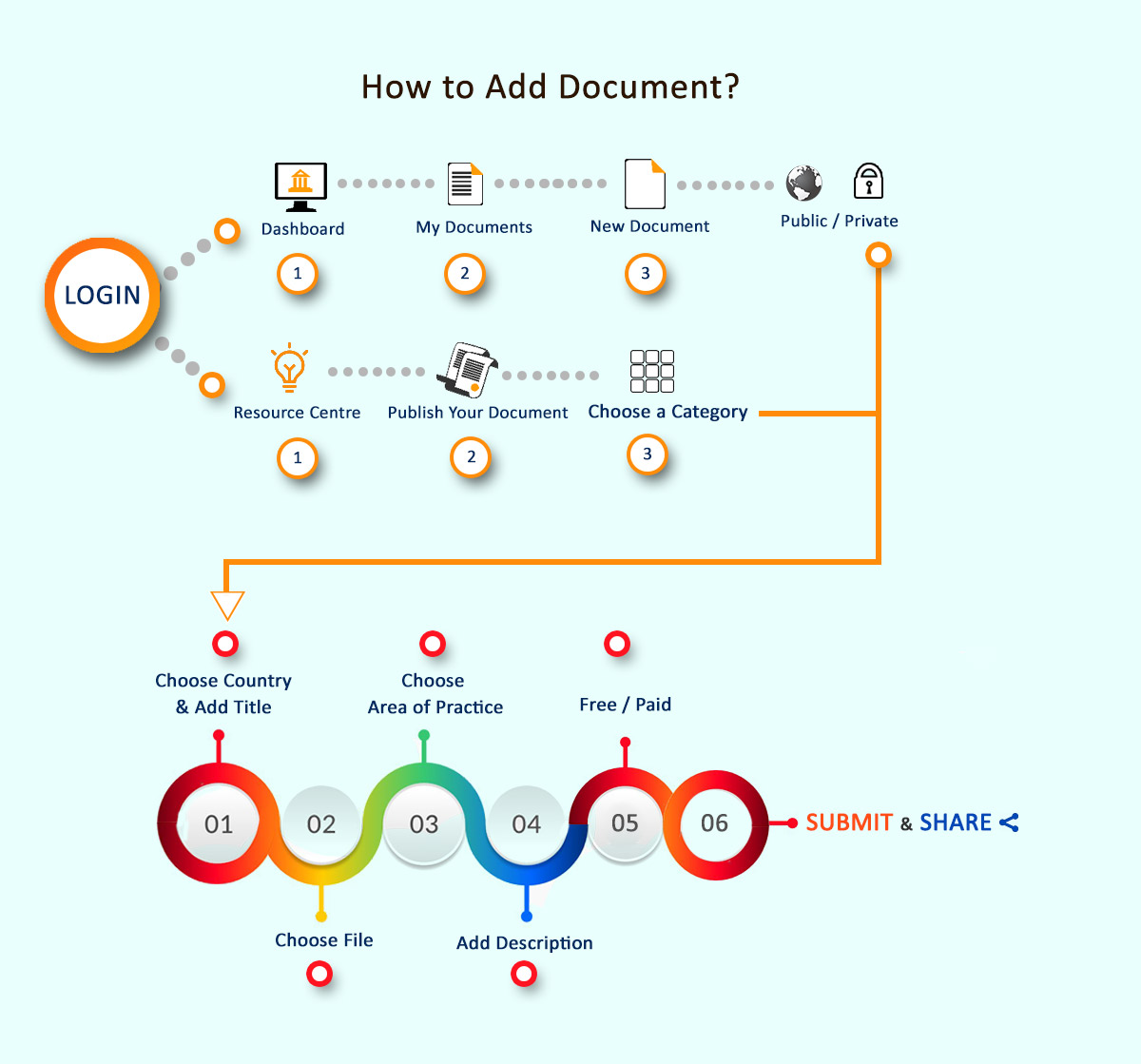
Please login with your credentials and follow below steps:
5. Choose Document Visibility
For More Details: www.soolegal.com/sell-your-documents
Upload here: www.soolegal.com/rc/adddocument